Point-of-Sale (POS) Systems: Understanding the Essentials for Modern Business

Introduction
Point-of-sale systems have evolved from simple cash registers into comprehensive business management platforms. Modern POS systems process payments, manage inventory, track sales analytics, handle employee scheduling, and integrate with accounting software all while providing faster, more secure checkout experiences.
Choosing the right POS system impacts daily operations, customer satisfaction, data insights, and long-term scalability. This guide explains what POS systems are, essential features, different types, selection criteria, and implementation best practices.
Primary Keyword: Point-of-sale systems Secondary Keywords: POS systems, POS software, retail POS, restaurant POS, POS features, POS implementation Keyword Clusters: System types, key features, industry-specific solutions, selection criteria
What is a Point-of-Sale System?
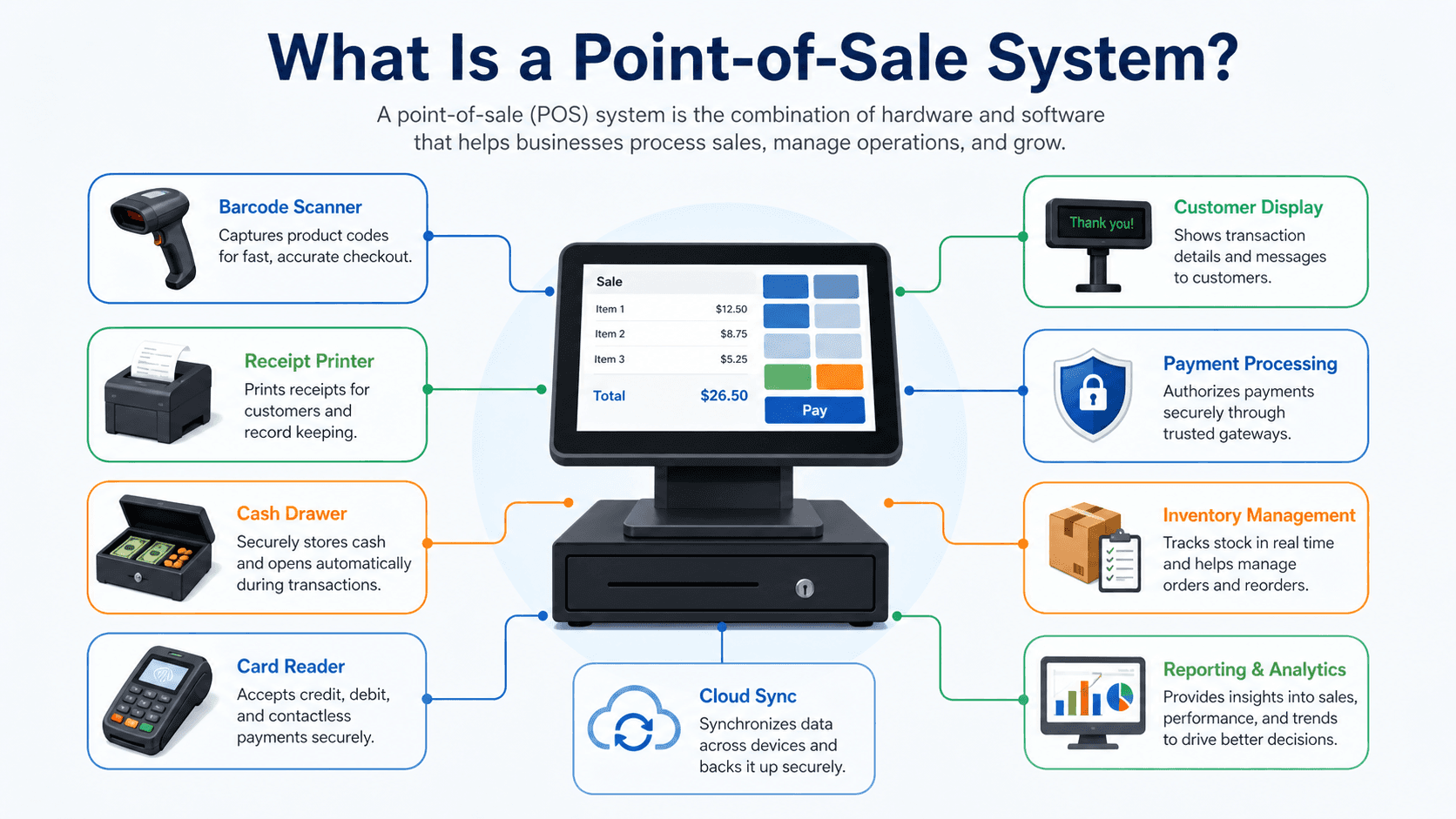
A point-of-sale (POS) system is the hardware and software combination businesses use to complete sales transactions. Modern POS systems combine payment processing with inventory management, customer relationship tools, reporting analytics, and business intelligence capabilities.
Core Components:
Hardware: Terminal or tablet, barcode scanner, receipt printer, cash drawer, card reader, customer display.
Software: Transaction processing interface, inventory management, reporting dashboards, customer database, employee management.
Payment Processing: Credit/debit card processing, mobile payments (Apple Pay, Google Pay), contactless payments, gift cards.
Backend Systems: Cloud-based data storage, integration with accounting software, multi-location management, e-commerce synchronization.
Essential POS Features
Payment Processing:
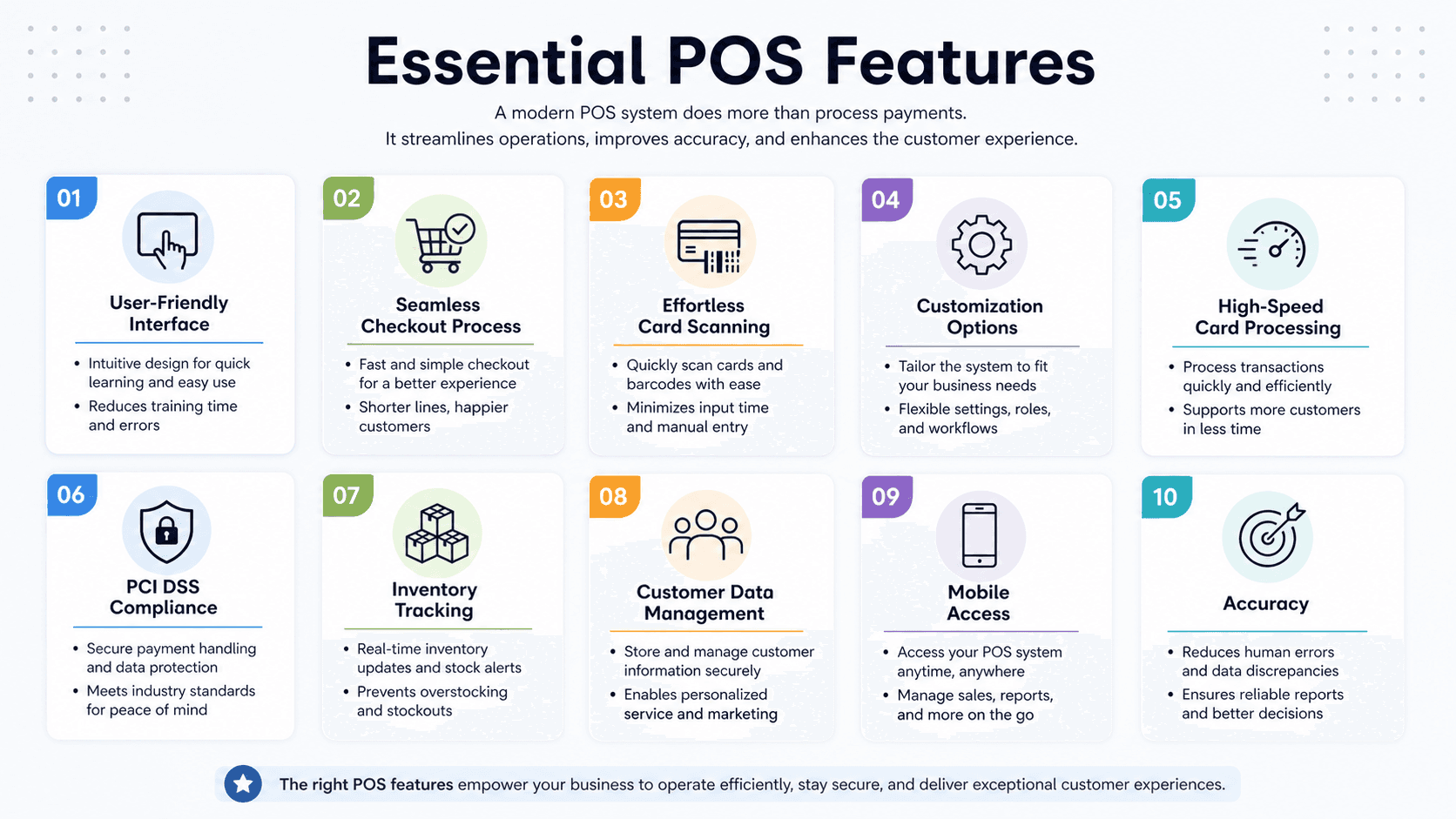
Accept multiple payment types securely, EMV chip cards and contactless payments, split payments across multiple cards, gift card sales and redemption, refunds and voids with proper authorization.
Inventory Management:
Real-time stock tracking, low stock alerts, automatic reordering, product variants and modifiers, batch and serial number tracking, multi-location inventory sync.
Sales Reporting and Analytics:
Sales by product, category, time, employee, profit margin analysis, sales trends and forecasting, customer purchase history, peak hours and traffic patterns.
Employee Management:
Time clock and scheduling, sales performance tracking, role-based permissions, commission calculations, tip distribution and reporting.
Customer Relationship Management:
Customer profiles and purchase history, loyalty programs, targeted promotions, email marketing integration, customer feedback collection.
Types of POS Systems
Traditional/Legacy POS:
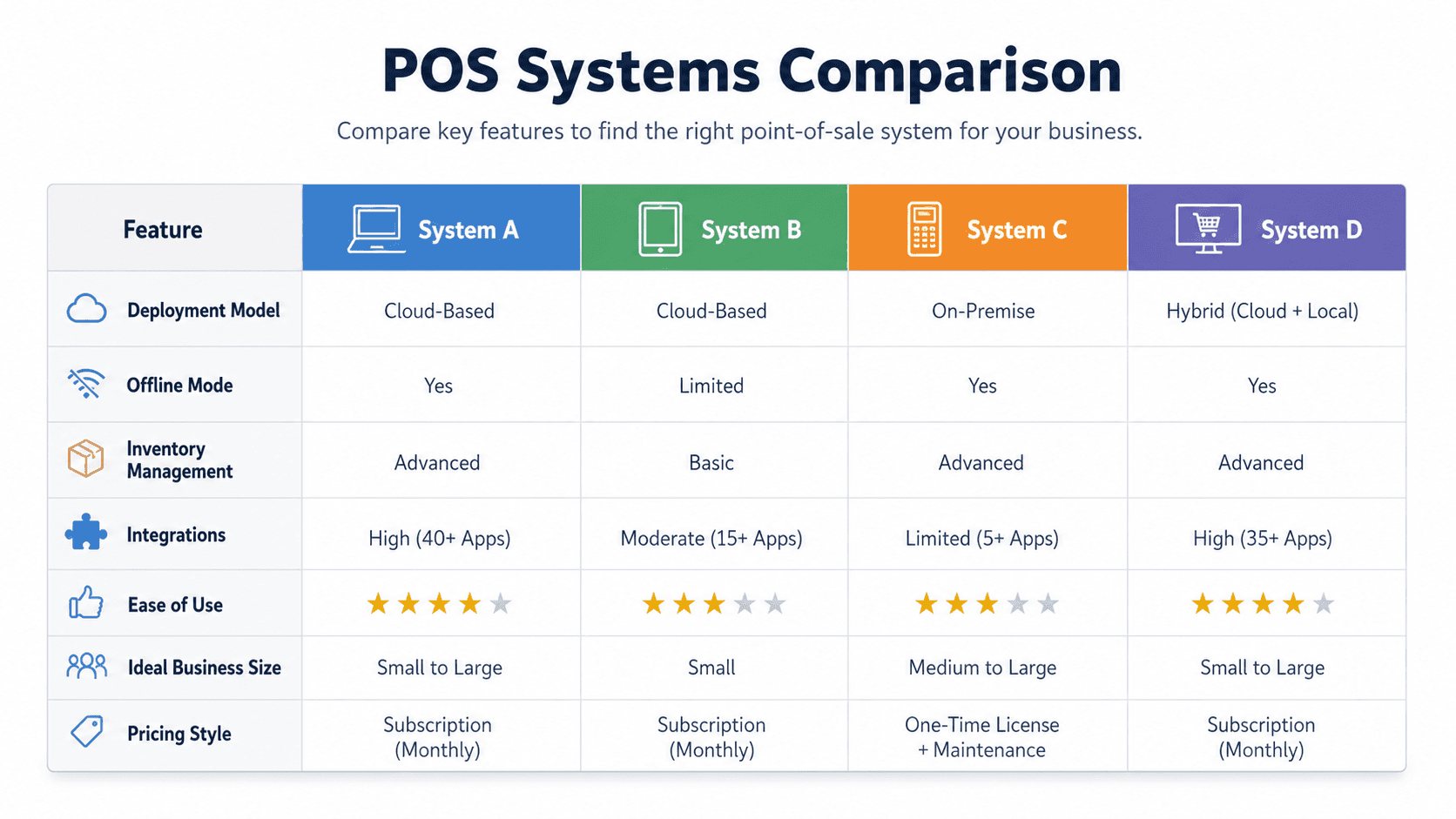
On-premise servers and proprietary software, requires significant upfront investment, limited flexibility and customization, works offline but lacks cloud benefits.
Best For: Established businesses with complex legacy integrations preferring on-premise data control.
Cloud-Based POS:
Internet-connected systems storing data in the cloud, accessible from any device with internet, automatic updates and backups, subscription-based pricing, real-time multi-location synchronization.
Best For: Modern businesses wanting flexibility, scalability, and remote access. Most new businesses choose cloud-based systems.
Mobile POS (mPOS):
Tablet or smartphone-based systems, portable for line-busting or pop-up shops, lower hardware costs, wireless payment processing, integrated with cloud systems.
Best For: Food trucks, pop-up retail, market vendors, businesses wanting checkout flexibility.
Self-Service Kiosks:
Customer-operated terminals, reduces staff requirements, increases order accuracy, upsells through suggestive prompts, faster throughput during peak times.
Best For: Quick-service restaurants, stadiums, cinemas, high-volume retail.
Tablet POS:
iPad or Android tablet-based systems, intuitive touchscreen interfaces, affordable hardware, extensive app ecosystems, space-saving designs.
Best For: Small to medium businesses, cafes, boutiques, service businesses.
Industry-Specific POS Solutions
Retail POS:
Product catalog management, size/color variants, barcode scanning, customer loyalty programs, integrated e-commerce, seasonal promotions, returns and exchanges.
Leading Systems: Square, Shopify POS, Lightspeed Retail, Vend.
Restaurant POS:
Table management and reservations, kitchen display systems, menu customization and modifiers, split checks and bar tabs, delivery integration, recipe costing.
Leading Systems: Toast, Square for Restaurants, Clover, TouchBistro.
Salon/Spa POS:
Appointment scheduling, client history and preferences, service packages, product and service sales, technician commissions, automated reminders.
Leading Systems: Vagaro, Mindbody, Square Appointments.
Grocery POS:
Scale integration for produce, EBT/SNAP payment processing, age verification prompts, high-speed scanning, department-specific pricing.
Leading Systems: NCR, Clover, Lightspeed.
Bar/Nightclub POS:
Tab management, age verification, batch closing, inventory by bottle, drink recipe costing, server overpouring tracking.
Leading Systems: Square for Restaurants, Toast, Lavu.
How to Choose the Right POS System
Assess Your Business Needs:
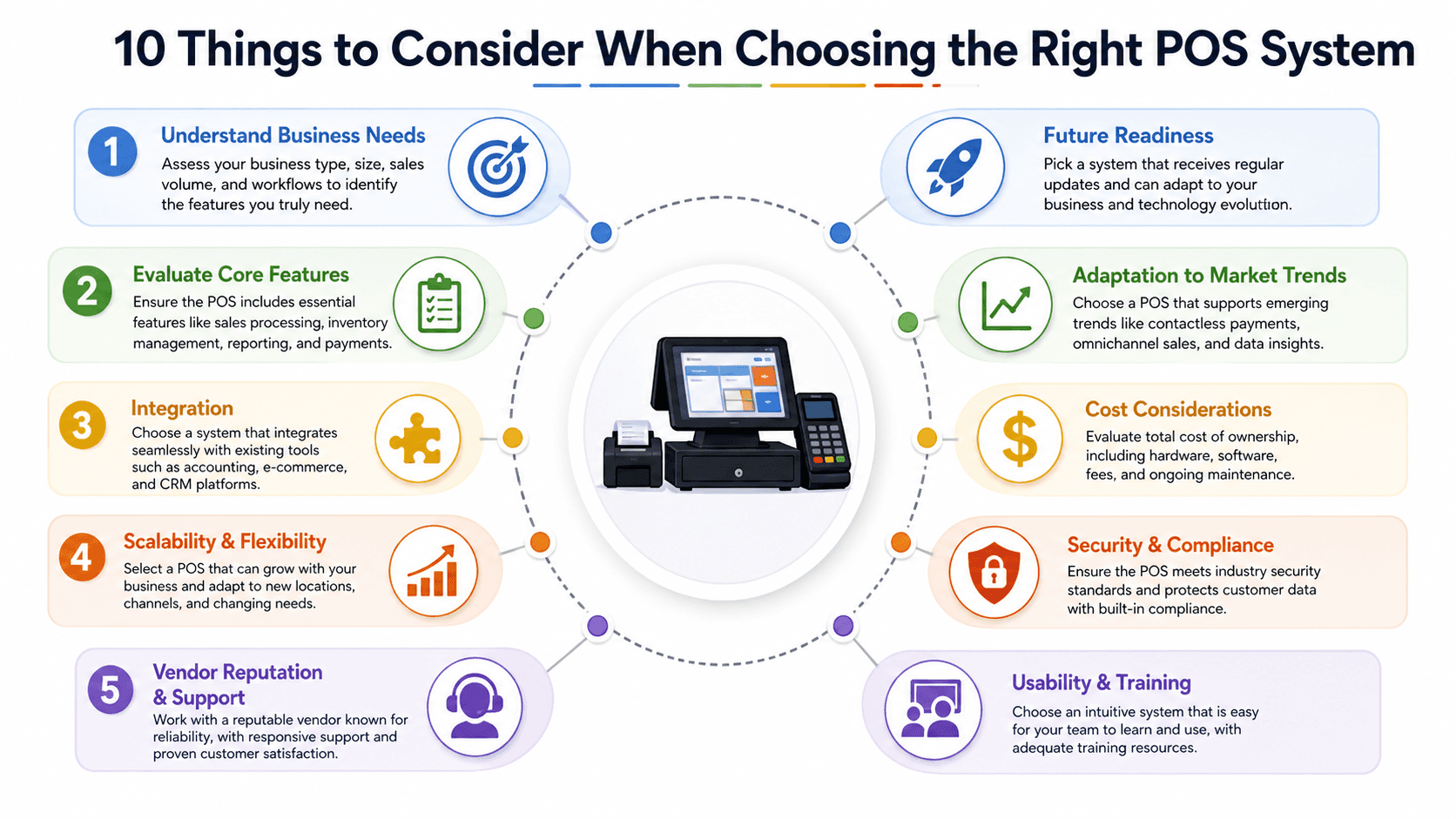
Transaction volume and speed requirements, inventory complexity and tracking needs, employee count and management needs, reporting and analytics requirements, integration with existing systems.
Consider Industry Fit:
Industry-specific features matter significantly. Restaurant features differ dramatically from retail or service business needs. Choose systems designed for your industry.
Evaluate Costs:
Hardware costs (terminals, printers, scanners), software subscriptions (monthly or annual), payment processing fees (percentage + per-transaction), training and implementation, ongoing support.
Check Integration Capabilities:
Accounting software (QuickBooks, Xero), e-commerce platforms (Shopify, WooCommerce), email marketing, loyalty programs, payroll systems, third-party delivery services.
Test Ease of Use:
Intuitive interface requiring minimal training, mobile accessibility for management, customer-facing display options, clear reporting dashboards, reliable customer support.
Ensure Scalability:
Multi-location support, growing product catalog capacity, expanding employee management, increasing transaction volume, additional features as business grows.
POS Implementation Best Practices
Planning Phase:
Define requirements and must-have features, research and compare systems, request demos from top choices, check references from similar businesses, plan data migration strategy.
Setup and Configuration:
Import product catalog and pricing, configure tax rates and rules, set up employee accounts and permissions, customize receipt templates, establish backup procedures.
Training:
Train all employees on core functions, create quick-reference guides, practice scenarios before going live, designate super users for ongoing support, schedule follow-up training sessions.
Testing:
Process test transactions, verify inventory tracking accuracy, test all payment types, ensure receipt printing works, check reporting accuracy.
Go-Live:
Start during slow period if possible, have vendor support available, monitor closely for issues, gather employee feedback, address problems immediately.
Ongoing Optimization:
Review reports regularly, update product information, adjust permissions as needed, take advantage of new features, optimize workflows based on usage.
Common POS Challenges and Solutions
Challenge: High Processing Fees
Solution: Compare processing rates across providers, negotiate better rates as volume grows, understand interchange fees, consider flat-rate vs. interchange-plus pricing.
Challenge: Internet Dependency
Solution: Choose systems with offline mode, maintain backup internet connection, understand offline capabilities and limitations, sync automatically when connection restored.
Challenge: Staff Resistance
Solution: Involve staff in selection, emphasize benefits to their work, provide thorough training, address concerns directly, celebrate quick wins.
Challenge: Data Security
Solution: Choose PCI-compliant systems, implement strong passwords and two-factor authentication, train staff on security practices, regularly update software, use encrypted connections.
Challenge: Integration Issues
Solution: Verify integrations before purchase, use systems with robust APIs, work with implementation specialists, test thoroughly before going live.
Future of POS Technology
Emerging Trends:
AI and Machine Learning: Predictive inventory management, dynamic pricing, personalized recommendations, fraud detection.
Contactless and Biometric Payments: Facial recognition, palm scanning, continued growth of tap-to-pay.
Integrated E-Commerce: Seamless online-offline inventory sync, buy online pick up in store (BOPIS), unified customer experience.
Advanced Analytics: Real-time dashboards, predictive sales forecasting, automated reporting, AI-powered insights.
IoT Integration: Smart shelves tracking inventory, automated reordering, connected kitchen equipment, environmental sensors.
Frequently Asked Questions
How much does a POS system cost? Varies widely: Simple mobile systems start $0-$50/month plus hardware ($100-$500). Full retail/restaurant systems range $1,200-$10,000+ for hardware plus $50-$300/month software. Processing fees typically 2.3-3.5% per transaction.
Can I use my own devices with POS software? Many cloud-based POS systems work on existing tablets or computers. However, you'll still need peripheral hardware (card readers, printers). Using existing devices reduces upfront costs but ensure compatibility first.
What happens if my POS system goes down? Quality systems have offline modes processing transactions and syncing when connectivity returns. Always have backup payment processing methods (manual credit card imprinters or mobile card readers) for extended outages.
Do I need internet for POS systems? Most modern cloud-based POS systems require internet but include offline modes for basic transactions. Traditional on-premise systems work without internet but lack cloud benefits. Strong, reliable internet is essential for optimal POS performance.
How long does POS implementation take? Simple setups: 1-3 days. Complex multi-location implementations: 2-8 weeks. Time depends on data migration needs, customization requirements, integration complexity, and staff training schedules.
Can POS systems integrate with my accounting software? Most modern POS systems integrate with popular accounting platforms (QuickBooks, Xero). Integration quality varies - some require manual export/import while others sync automatically in real-time. Verify integration capabilities before committing.
Conclusion
Point-of-sale systems have evolved into comprehensive business management platforms essential for modern retail, restaurant, and service operations. Choosing the right POS system requires understanding your specific needs, evaluating features against requirements, considering total costs, and ensuring scalability for growth.
Cloud-based POS systems offer flexibility, accessibility, and automatic updates appealing to most new businesses. Industry-specific solutions provide tailored features for restaurants, retail, salons, and other verticals. Mobile POS options create flexibility for businesses needing portable payment processing.
Successful POS implementation requires thorough planning, comprehensive training, careful testing, and ongoing optimization. The investment in time and resources pays dividends through improved operational efficiency, better inventory management, enhanced customer experiences, and data-driven decision making.
As technology continues advancing, POS systems will incorporate more AI-powered insights, seamless omnichannel capabilities, and integrated business management features. The businesses thriving will be those leveraging modern POS technology strategically while maintaining focus on customer experience and operational excellence.
Begin your POS selection process by clearly defining requirements, researching industry-specific solutions, requesting demos from top contenders, and planning thorough implementation. The right POS system becomes the operational backbone supporting business growth, efficiency, and customer satisfaction for years to come.
Timeframe
2022 - 2023
Client
Escoba Inc.