What is SaaS (Software as a Service)? The Complete Guide to Cloud-Based Software
What is SaaS (Software as a Service)? The Complete Guide to Cloud-Based Software
Introduction
The way businesses access and use software has fundamentally transformed over the past two decades. Gone are the days of purchasing boxed software, installing it on individual computers, and managing updates manually. Software as a Service (SaaS) has emerged as the dominant delivery model, revolutionizing how companies of all sizes implement technology solutions.
SaaS represents more than just a technical innovation it's a business model shift that has democratized access to enterprise-grade software. Small startups now use the same sophisticated tools as Fortune 500 companies, paying only for what they need without massive upfront investments.

Understanding SaaS is essential whether you're a business owner evaluating software options, an entrepreneur considering a SaaS business model, or a professional navigating the modern technology landscape. This model powers the tools you likely use daily from email and collaboration platforms to customer relationship management and accounting software.
This comprehensive guide explains what SaaS is, how it differs from traditional software, why it has become the dominant model, the benefits and challenges it presents, and what to consider when choosing SaaS solutions for your business. You'll gain clarity on subscription pricing, implementation considerations, and the future trajectory of software delivery.
What is SaaS? Defining Software as a Service
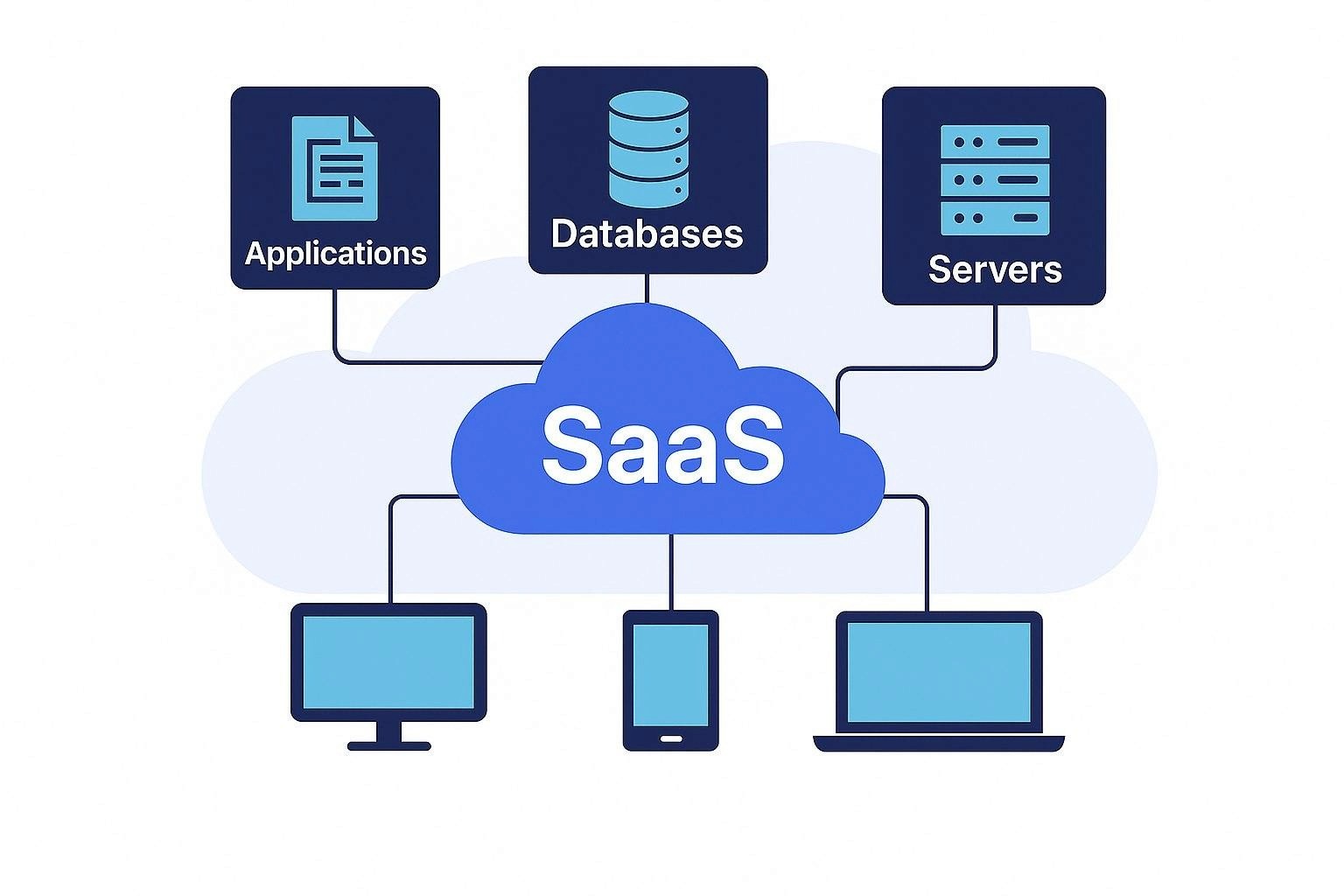
Software as a Service (SaaS) is a software delivery model where applications are hosted in the cloud and accessed through the internet rather than installed on individual devices. Users access the software through web browsers or dedicated apps, with the provider managing infrastructure, security, updates, and maintenance.
Core Characteristics of SaaS
Cloud-Hosted: The software runs on the provider's servers (typically in distributed data centers), not on users' local machines.
Internet Access: Users access the application through internet connections rather than launching locally installed programs.
Subscription-Based: Customers typically pay recurring fees (monthly or annual) rather than one-time perpetual licenses.
Multi-Tenant Architecture: Multiple customers share the same application instance while data remains isolated and secure.
Automatic Updates: The provider pushes updates and new features to all users automatically without requiring manual installation.
Scalable: Users can easily increase or decrease usage, adding or removing users and features as needs change.
Accessible Anywhere: Applications work from any device with internet access and a compatible browser, enabling remote work and mobility.
Common SaaS Examples
You probably use SaaS applications daily without thinking about the underlying model. Gmail, Microsoft 365, Salesforce, Slack, Zoom, Dropbox, Netflix, Spotify, QuickBooks Online, and thousands of other applications operate as SaaS.
These platforms exemplify the model: you access them through browsers or apps, pay subscription fees, receive automatic updates, and the provider handles all technical infrastructure.
How SaaS Differs from Traditional Software
Understanding SaaS requires contrasting it with traditional software delivery models.
Traditional On-Premises Software
Installation: Software installs on individual computers or company servers.
Licensing: Customers purchase perpetual licenses with significant upfront costs.
Updates: Users manually download and install updates, often paying separately for major version upgrades.
Infrastructure: Companies maintain their own hardware, servers, and IT infrastructure.
Accessibility: Software typically only works on devices where it's installed, limiting mobility.
Customization: Extensive customization possible but creates upgrade complexity.
Examples: Microsoft Office (desktop versions), Adobe Creative Suite (pre-Creative Cloud), traditional enterprise software like SAP.
SaaS Model
Access: Users log in through web browsers from any device.
Pricing: Subscription fees spread costs over time with predictable monthly or annual payments.
Updates: Automatic and continuous, with new features and security patches deployed transparently.
Infrastructure: Provider manages all hardware, servers, and technical operations.
Accessibility: Works from anywhere with internet access across multiple devices.
Customization: Configuration options exist but extensive custom coding is limited to maintain upgrade compatibility.
Examples: Salesforce, Google Workspace, Zoom, Shopify, HubSpot.
The Hybrid: PaaS and IaaS
SaaS exists alongside related cloud models
Platform as a Service (PaaS): Provides development platforms for building custom applications (e.g., Heroku, Google App Engine).
Infrastructure as a Service (IaaS): Provides fundamental computing resources like servers and storage (e.g., Amazon Web Services, Microsoft Azure).
SaaS delivers complete applications ready to use, while PaaS provides platforms for developers and IaaS provides raw infrastructure.
The Evolution of SaaS: From On-Premises to Cloud
SaaS didn't emerge overnight but evolved through several technological and business model innovations.
Pre-2000s: Packaged Software Dominance
Software came in boxes, installed from floppy disks or CDs, required significant IT support, and locked customers into multi-year update cycles with expensive upgrades.
Early 2000s: Application Service Providers (ASP)
Early cloud pioneers offered hosted applications, but technology limitations (slow internet, immature infrastructure) prevented widespread adoption. Salesforce, founded in 1999, pioneered the modern SaaS model with cloud-based CRM.
Mid-2000s: Broadband Enables SaaS
Widespread broadband internet made cloud applications practical. Companies like Google (Gmail, Google Apps), NetSuite, and Workday launched successful SaaS businesses.
2010s: SaaS Goes Mainstream
Improved internet speeds, mobile devices, and cloud infrastructure maturation made SaaS the default for new software. Microsoft shifted Office to subscription-based Microsoft 365. Adobe moved Creative Suite to Creative Cloud. Enterprise software migrated to cloud models.
2020s: SaaS Dominance
The COVID-19 pandemic accelerated SaaS adoption as remote work became essential. Today, SaaS represents the primary software delivery model for most business applications, with traditional on-premises software becoming the exception rather than the rule.
Key Benefits of SaaS for Businesses

SaaS has become dominant because it delivers substantial advantages over traditional software.
Lower Upfront Costs
Subscription pricing eliminates massive capital expenditures for software licenses. Instead of $50,000 upfront for enterprise software, companies pay $50-500 per user monthly, making sophisticated tools accessible to small businesses.
Predictable Operating Expenses
Monthly or annual subscriptions create predictable, budgetable costs rather than unpredictable upgrade cycles and maintenance fees.
Faster Implementation
SaaS applications deploy in days or weeks rather than months-long on-premises installations. Users create accounts, configure settings, and start working immediately.
Automatic Updates
Providers push updates automatically, ensuring users always run the latest version with newest features and security patches. No more manual downloads, compatibility testing, or upgrade projects.
Scalability
Adding or removing users happens instantly. Seasonal businesses scale up during busy periods and down during slow seasons without purchasing unnecessary licenses.
Accessibility and Mobility
Browser-based access enables work from anywhere on any device home, office, coffee shop, airport. This flexibility has become essential in remote and hybrid work environments.
Reduced IT Burden
Providers handle server maintenance, security patches, performance optimization, and technical infrastructure, reducing internal IT workload and costs.
Lower Risk
Shorter commitments (monthly or annual) reduce risk compared to multi-year license purchases. If a solution doesn't fit, switching costs remain manageable.
Integration Ecosystem
Modern SaaS applications offer extensive APIs and pre-built integrations, connecting tools into unified workflows more easily than traditional software.
Continuous Innovation
Subscription models incentivize providers to continuously improve products to retain customers, delivering more frequent enhancements than traditional update cycles.
Challenges and Limitations of SaaS
Despite substantial benefits, SaaS presents challenges organizations must address.
Internet Dependency
SaaS requires reliable internet connectivity. Outages or slow connections disrupt work. While some applications offer offline modes, functionality typically requires online access.
Data Security and Privacy
Storing sensitive data on third-party servers creates security and compliance concerns. Organizations must trust providers' security measures and ensure compliance with regulations like GDPR or HIPAA.
Customization Limitations
SaaS applications offer configuration options but typically limit deep customization compared to on-premises software where companies control source code.
Vendor Lock-In
Migrating between SaaS platforms can be complex and expensive, creating dependency on specific vendors. Data export formats, integration complexity, and user retraining create switching costs.
Ongoing Costs
While upfront costs are lower, subscription fees accumulate indefinitely. Over many years, total cost may exceed traditional perpetual licenses for stable deployments.
Performance Variability
Application performance depends on internet speed and provider infrastructure. Users have less control over performance optimization than on-premises deployments.
Compliance Complexity
Regulated industries face challenges ensuring SaaS providers meet specific compliance requirements for data handling, storage locations, and access controls.
Feature Updates Without Consent
Automatic updates sometimes introduce unwanted changes or remove features users relied on, with no option to remain on previous versions.
Understanding these limitations helps organizations make informed decisions and implement appropriate mitigation strategies.
SaaS Pricing Models Explained
SaaS companies employ various pricing strategies to monetize their applications.
Per-User Pricing
The most common model charges monthly or annual fees per user. Example: $25/user/month for project management software.
Advantages: Simple, predictable, scales with company size. Disadvantages: Can become expensive for large teams.
Tiered Pricing
Multiple pricing tiers offer different feature sets and usage limits. Example: Basic ($10/month), Professional ($25/month), Enterprise ($50/month).
Advantages: Serves different customer segments, upsell path as needs grow. Disadvantages: Feature selection can confuse buyers.
Usage-Based Pricing
Charges based on consumption—emails sent, storage used, API calls made. Example: SendGrid charges per email sent.
Advantages: Aligns costs with value received, attractive to low-volume users. Disadvantages: Unpredictable monthly costs.
Freemium Model
Free tier with limited features, paid upgrades for advanced capabilities. Example: Slack offers free access with message history limits, paid plans remove restrictions.
Advantages: Low barrier to adoption, large user base, converts percentage to paid. Disadvantages: Free users cost money to support.
Flat-Rate Pricing
Single price regardless of users or usage. Example: Basecamp charges one monthly fee for unlimited users.
Advantages: Simple, predictable, scales without increasing costs. Disadvantages: Leaves money on table from high-value customers.
Feature-Based Pricing
Charges based on specific features enabled rather than user count. Example: CRM with basic features vs. advanced analytics add-on.
Most SaaS companies combine elements from multiple models, such as tiered pricing with per-user charges within each tier.
Choosing the Right SaaS Solution for Your Business
Selecting SaaS applications requires evaluating multiple factors beyond features and price.
Business Requirements Assessment
Current Pain Points: What specific problems need solving? Define requirements clearly before evaluating solutions.
Must-Have vs. Nice-to-Have Features: Distinguish essential capabilities from bonus features to avoid over-buying.
User Adoption Considerations: How tech-savvy are intended users? Simple, intuitive interfaces drive adoption; complex tools face resistance.
Evaluation Criteria
Functionality: Does it solve your specific problem comprehensively?
Integration Capabilities: Does it connect with existing tools (CRM, accounting, email, etc.)?
Scalability: Can it grow with your business without forced migrations?
Security and Compliance: Does it meet your industry's regulatory requirements?
Reliability and Uptime: What's the provider's track record? (Check status pages and review sites.)
Support Quality: What support channels exist? Response times? Documentation quality?
Pricing Structure: Does the pricing model align with how you'll use the software?
Vendor Stability: Is the provider financially stable? Will they exist in five years?
Trial Process
Most SaaS providers offer free trials. Use them strategically
Test with actual use cases, not hypothetical scenarios
Involve end users who'll actually use the software daily
Evaluate integration with existing tools
Test support responsiveness
Review user onboarding and training resources
Implementation Planning
Data Migration: How will you migrate existing data? What formats export/import?
User Training: What training resources exist? Who will train users internally?
Change Management: How will you drive adoption and overcome resistance?
Integration Setup: What technical resources are needed for connecting systems?
The Future of SaaS: Emerging Trends
SaaS continues evolving with technological advancement and changing business needs.
Artificial Intelligence Integration
AI capabilities are becoming standard features in SaaS applications—predictive analytics in CRM, automated categorization in accounting software, smart scheduling in calendar apps.
Vertical SaaS
Industry-specific SaaS solutions tailored for healthcare, legal, construction, hospitality, and other sectors provide deeper functionality than horizontal tools.
Micro-SaaS
Small, focused applications solving specific problems rather than comprehensive suites. Often built by solo entrepreneurs or small teams serving niche markets.
Composable Applications
Rather than monolithic platforms, businesses assemble best-of-breed tools connected through APIs, creating custom technology stacks.
Enhanced Security and Compliance
As SaaS handles more sensitive data, providers invest heavily in security certifications, compliance frameworks, and data sovereignty options.
Embedded Analytics
Advanced reporting and analytics become standard across SaaS categories, reducing need for separate business intelligence tools.
Mobile-First Design
As mobile work continues growing, SaaS applications prioritize mobile experience rather than treating it as an afterthought.
Consolidation
Major platforms acquire smaller SaaS companies, offering integrated suites. Microsoft, Salesforce, Adobe, and others build comprehensive ecosystems.
Frequently Asked Questions
Is SaaS the same as cloud computing? SaaS is one type of cloud computing, specifically delivering software applications. Cloud computing also includes Infrastructure as a Service (IaaS) and Platform as a Service (PaaS). All SaaS is cloud-based, but not all cloud computing is SaaS.
Can I use SaaS without internet access? Most SaaS applications require internet connectivity. Some offer limited offline modes for specific functions, but full functionality typically requires online access. This internet dependency is a key consideration when evaluating SaaS solutions.
Is my data safe in SaaS applications? Reputable SaaS providers invest heavily in security—encryption, access controls, regular audits, and compliance certifications. However, security is shared responsibility. Choose providers with strong security track records and implement proper access controls within your organization.
How does SaaS pricing compare to traditional software long-term? Initial costs favor SaaS (lower upfront), but over 5-10 years, cumulative subscription costs may exceed traditional perpetual licenses. However, SaaS includes updates, maintenance, and infrastructure that would cost extra with traditional software. Total cost of ownership depends on specific scenarios.
Can I customize SaaS applications? SaaS offers configuration options—custom fields, workflows, permissions, branding—but limits deep code-level customization to maintain upgrade compatibility. For highly specialized needs, traditional software or custom development may suit better.
What happens to my data if I cancel a SaaS subscription? Reputable providers offer data export in standard formats before cancellation. Review contracts for data retention policies and export capabilities before committing. Always maintain backups of critical data independently.
Conclusion
Software as a Service has fundamentally transformed how businesses access and use technology. By delivering applications through the cloud with subscription pricing, automatic updates, and anywhere access, SaaS has democratized enterprise-grade software for organizations of all sizes.
The model's benefits—lower upfront costs, faster implementation, automatic updates, scalability, and reduced IT burden—explain why SaaS has become the dominant software delivery approach. While challenges like internet dependency, data security considerations, and subscription costs exist, most organizations find the advantages outweigh the limitations.
For businesses evaluating software, SaaS often provides the most practical, cost-effective solution. The key is careful evaluation—clearly defining requirements, testing thoroughly through trials, assessing vendor stability and security, and planning implementation thoughtfully.
For entrepreneurs, the SaaS model offers attractive business opportunities. Recurring revenue, global market reach, continuous customer relationships, and lower distribution costs make SaaS businesses scalable and valuable. However, success requires solving real problems, delivering exceptional user experience, and building sustainable competitive advantages.
As technology continues evolving, SaaS will adapt and improve. AI integration, industry specialization, enhanced security, and mobile-first experiences will shape the next generation of cloud software. Organizations that embrace SaaS strategically position themselves to leverage these innovations as they emerge.
Whether you're using SaaS applications daily, evaluating solutions for your business, or considering building a SaaS company, understanding this model's fundamentals, benefits, challenges, and trajectory enables better decisions and more effective technology leverage. SaaS isn't just a delivery model—it's the foundation of modern business technology infrastructure.
Timeframe
2022 - 2023
Client
Escoba Inc.